
The Christmas Pixels Caper
- Dec 5, 2025
- 8 min read
Updated: Dec 13, 2025
I was idly mulling over ideas for what to add to my Christmas lights and somehow ended up browsing AliExpress for DMX products. My outdoor Christmas lights rig is entirely DMX controlled, so anything I add needs to support this protocol. I already have DMX-controlled relays for the fairy lights, and DMX-controlled RGB LED fixtures.
I soon came across DMX-controlled RGB LED drivers like this, and a plan started to form.

What if I use these controllers together with some RGB LEDs to create some sort of large scale lighting effect over the whole house? Earlier this year I'd been enthralled by some of the ways the show Starlight Express uses in its theatre, including this one scene where the whole place is filled with tiny pixels of light. I'm never gonna get close, I'm not a West End theatrical production, but still, I can have a bit of fun.
The Plan!
2 x 30-channel DMX LED controllers to drive a total of 20 LED "pixels".
Each pixel to have a RGB LED.
The pixels will be spread out around the house so need to be cabled back to the DMX controllers with one four-core cable per pixel.
Everything needs to be waterproof.
Patterns of colour etc. on the pixels will be controlled by the Avolites console as if the pixels were regular RGB fixtures.
LEDs
I found a bag of 100x 5mm RGB LEDs on AliExpress for a pittance. I just had to be careful to buy common-anode LEDs to match the way the DMX controllers are wired. You can get common-anode and common-cathode LEDs easily so it's just a case of picking the right type.
Then I had a crisis of confidence and decided that a single RGB LED might not be bright enough, so I figured I'd triple them up. Later, when I came to design the PCB, I realised it was just easier to have two LEDs rather than three, not least because it was easier to physically position them close to eachother so their light otuput would appear to the onlooker to be coming from a single point source (a pixel no less.)
The LEDs need 20mA per colour at 3V. The controller is good for up to 2A at 24V per channel(!), not that I have a PSU that's capable of anywhere near that, but even with the 12V 25W PSUs I had in my parts box I've got enough juice to run multiple LEDs per pixel.
Circuit
I needed to drop the 12V supply from the controller down to approx 3V for the LED. A simple potential divider with a resistor will do here; the resistor will have to drop 12V - 3V = 9V, and I want 20mA flowing to ensure the LED is as bright as it can be. So 9V at 20mA gives us 9/0.02 = 450 Ohms. So 470 is close enough.
The resistor will dissipate approx. 180mW, so I figured standard 1/4W resistors would do fine. As it happened, I accidentally ordered 1/2W resistors, and they get warm enough, so I'm glad I built in the extra leeway.
When the LEDs arrived the datasheet revealed the red component only needs 2V instead of 3V, so changing the R resistor to 10/0.02 ~= 560 Ohms accommodated that.
Every LED may have a slightly different voltage drop across it so by using individual resistors per-LED, this won't cause a problem. Sharing a resistor between the LEDs would mean no control over current distribution through one or the other, which could end up with uneven flow and maybe burned out LEDs, so worth avoiding.
The resulting circuit looks like:

Prototype
It lives!

PCB Design
Seeing other makers have custom PCBs made inspired me to investigate JLC PCB for this project. And they really do make it too easy, and susprisingly cheap! I ordered a job of 25 and they were pennies each (though shipping and tax meant the eventual cost was a little over £1 per board.)
I designed the circuit in EasyEDA, which creates the PCB layout with a single button press. My circuit was so incredibly simple the auto-routing of PCB tracks was pretty much perfect out of the door, all I needed to do was some tweaking to optimise placements and adjust labels.
But in short order I had a PCB design to hold my LEDs, resistors and a connector.

The design features both LEDs next to eachother at one end of the board. I planned to bend them flat to have them firing out longitudinally.
Connector
Making wires meet PCBs is a topic of its own! I originally envisaged needing to connect the cables to the PCBs while rigging the pixels outside so I wanted something simple and easy. Modular/reconnectable systems would have been the obvious direction but they all brought the cost per pixel up quite a lot. Instead I opted for cheap IDC connectors.
Cable
I'd already decided I'd run each pixel back to the controller individually, so I needed four-core cable. I toyed with running two off an eight-core (though common anode would mean I'd only need seven cores) but the physicalities involved in chaining LEDs while up a ladder on the house quickly put pay to this idea.
I have abundant Cat5 cable but it's all grey or purple, and I specifically wanted black to hide in the winter darkness outside. Also Cat5 is quite thick, not to mention a bit wasteful with its 8 cores. And it's not meant for carrying DC anyway, though would have worked ok for my purposes. So, anyway, I needed something different.
A quick bit of shopping on CPC later and I found the ideal stuff: 7/0.2mm, black, four-core, outer sheath a nicely thin 3.85mm, maximum current 1A. That'll carry my 120mA per pixel just fine.
Amusingly, the cable was the most expensive single component of this whole project.
LEDs and Directions
I planned to bend the LEDs flat off the end of the PCB so that the light fires out longitudinally from the pixel. But on further thought, I realised this would make fixing the pixels more challenging as I'd need to support the cable out of the back. Instead, by leaving the LEDs perpendicular to the PCB there's a natural 90-degree bend, so the cable can exit directly down with gravity and the beam from the LEDs can point more or less horizontally out.
PCB Assembly
I was maybe a little too excited to receive my JLC PCB order. But, wow! These are SO lovely and cute.


Encasing the Pixels
Obviously I needed some form of weatherproofing. The pixels will need to be outside in the good British winter for a couple of months and it's going to be cold, wet and windy. Specifically, I wanted to ensure the bright sparkliness of the pixels was maintained so whatever encloses them needed to be predominantly clear.
The answer came out of history: Back before cameras were digital we used to have to put film in them and this film came in little plastic pots which I remembered being about the perfect size. I found film pots are still easily available on Amazon. Obviously not for film anymore, but I guess people still find uses for little well-sealed plastic pots.
The cable exits through a hole drilled in the lid and the PCB fits snugly inside.
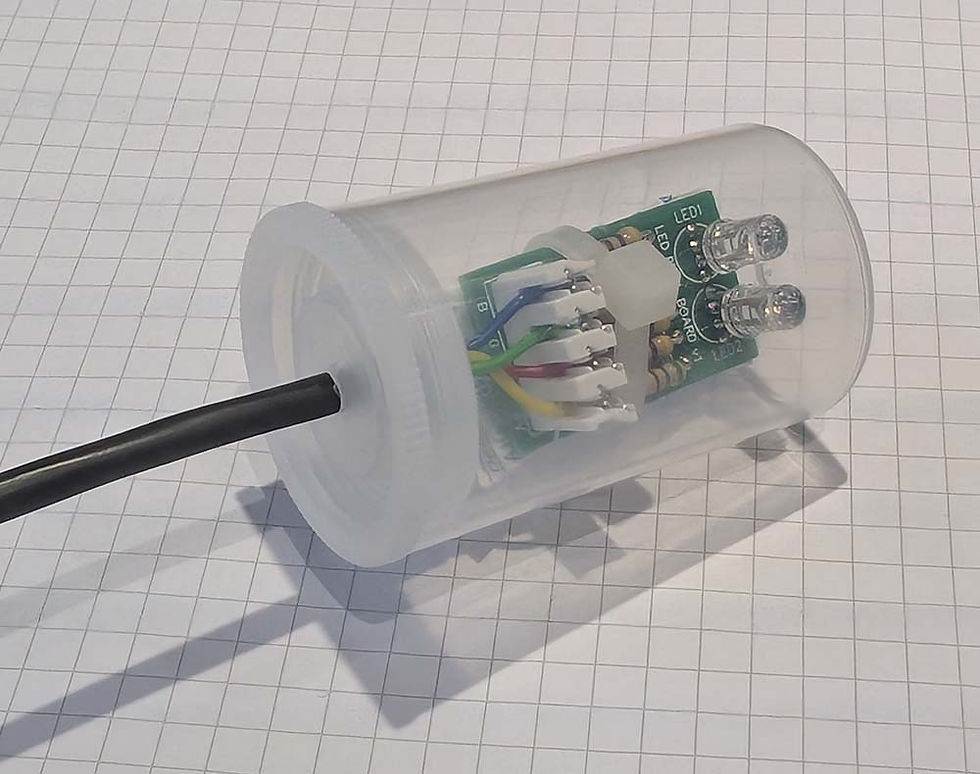
The only problem with this design is a lack of true cord grip. I drilled a 3.5mm hole for the 3.85mm cable so there's naturally some resistance to movement, but not enough. The cable, heavy compared to the small PCBs, spins around and moves the PCB with it. I ended up using cable ties to secure the cable to the pot before rigging in order to control the direction in which the LEDs beam.
Final Assembly
Not visible in the photo above is a small packet of silica gel, secured by that cable tie loosely across the middle of the PCB. I don't want the transparent pot to fog up should any moisture make it inside, so hopefully the silica will prevent that.
To minimise the amount of fiddling needed to do up a ladder, I realised I needed to pre-cut the cables. This required determining good locations for the controllers outdoors (which will be in weatherproof boxes) and then guesstimating the cable lengths for each pixel. I just broke into the third 100m reel of this stuff, meaning the project used just over 200m of cable. The longest individual run was about 25m.
For ease of connections on site (i.e. outside) I popped ferrules on the bare ends of the cables where they'll need to connect into the screw terminals on the controllers. It's hardly a hardwearing external grade connector but should only need to be connected/disconnected once a year, so that shouldn't be a problem.
Pixel Layout
The last part of the puzzle was working out exactly where the 20 pixels would go. Split between two controllers, the final layout looked like this.
The coloured blob shows which controller the pixel is cabled from.

Armed with this plan, I created a 2D representation of the layout in Titan (the Avolites lighting controller). Ignore the numbers between the plan (counting from 1) and the screenshot (Titan fixture ID starting at 25), but you can just about see a correlation between the layout in reality and in the software.

Titan will control the RGB LEDs according to this grid, allowing for the creation of effects that sweep upwards, downwards, leftwards, rightwards, or even concentrically. Practically, 20 pixels don't really allow for good concentric effects though.
Testing and Programming
The lighting programming for the display happened over the course of three different days in the sitting room (I had to wait for the house to be empty.) To mimic the layout of the pixels in real life I stuck them to an old clothes horse - just visible in the top of this photo.

Installation
A lot of cable ties later and the 20 pixels are strapped up around my house.
In some cases I needed to mount them at jaunty angles in order to focus the beams from the LEDs downwards towards the 'sweet spot' of a passer-by standing at the end of the driveway. I want that position to be hit directly with all the LED beams for maximum twinkle.


The Result
Well, they look.. ok?
The video here doesn't do them justice though, in reality they're super bright - I could probably have gotten away with a single LED in each. At times they're a bit lost in the display but overall I think they add something. Maybe I need to double the number next year : )
They are certainly unique and above all this was a fun project throughout from the PCB creation to the wanton usage of hundreds of metres of cable.


Hi, Your Christmas Pixels Caper project is fantastic-the final build and the lighting effects look really impressive! I’m Emily from PCBWay and we’d love to sponsor your diy project with free PCB prototyping. A brief review would be appreciated in return. Would you be up for collaborating with us?